
Prerequisites
Step 1: Set up URL tracking parameters
To ensure prospects land on the correct page with the necessary tracking data, you’ll need to make the following updates:- Submit a request to your team at Clutch to push the
utm_contentparameter into your data layer. Map this parameter toadvocate_codein GTM. - In your Extole Flow Campaign, navigate to
Share Link Behavior - Set the
Destination for Clicks on Share Linksto your specific online account URL. - Append the advocate’s referral code to your tracking parameters by updating the
utm_contentvariable with the following value:
utm_content
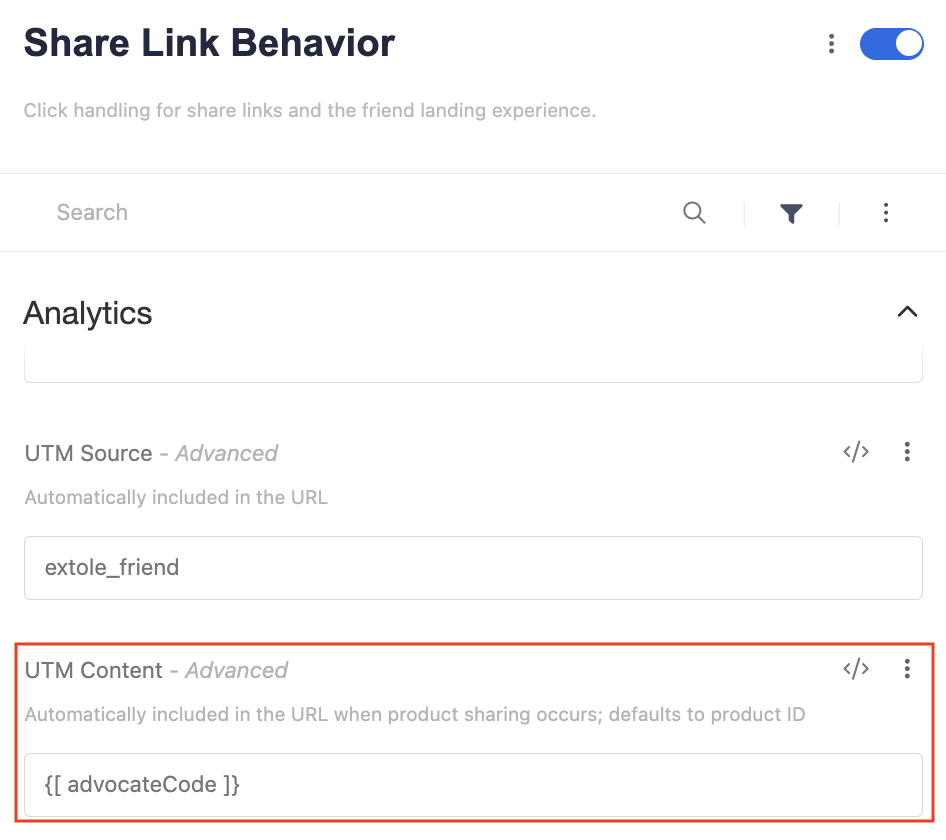
If you are already using the
utm_content parameter, Extole can pass the advocate_code as utm_term instead. Request this customization with your Extole team, then map to the utm_term parameter in your GTM.Step 2: Tag your account opening flow
Use Google Tag Manager (GTM) to deploy Extole’s core and event tags. Core tags are used for attribution and serving confirmation messages throughout the OAO flow. Event tags are used to enforce quality rules and track key conversion milestones throughout the account opening process.Learn more about Extole’s Javascript tags
Add the Extole core tag to all of your account opening pages
You can find your core tag in the Extole platform (Tech Center > Tag Generator.) It will look something like this:advocate_code
Add tags to fire events
Fire Extole’sapplication_submitted tag when the prospect/member completes their application. Use Clutch’s custom event trigger WC - DAO - App Submission.
Share Link Behavior
Step 3: Send account openings from Clutch to Extole via SFTP
Forward your daily export file from Clutch to Extole’s SFTP server to notify Extole of account openings. Extole will extract and process the data for any columns marked in bold in the table below.Learn how to connect to Extole’s SFTP server.