
Setting Up Reward Webhooks in My Extole
Extole supports multiple ways of knowing which rewards have been earned, including reports, API calls, delivery to internal and external SFTP servers, and real-time webhooks. Webhooks are most useful when you are trying to apply real-time account credits into an advocate or friend’s account as part of your program. Go to Outbound Webhooks located within the Tech Center of your My Extole account to configure your webhook. Under the Advanced section, you can filter the webhooks for certain reward states or suppliers.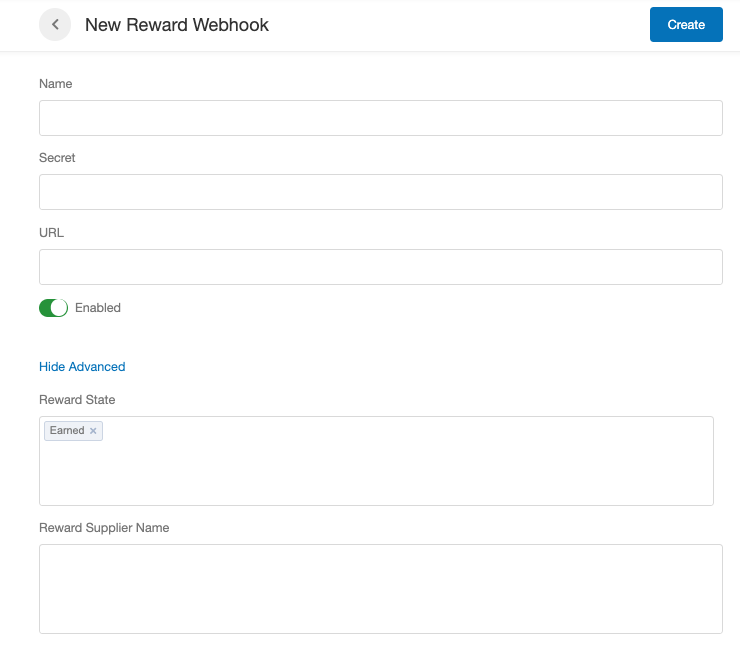
Filters
Events
When you are filtering your events, you will likely want to only include rewards in a given state. The supported reward states are as follows:- Earned
- Fulfilled
- Failed
- Sent
- Redeemed
- Canceled
- Revoked
Use cases
- If you want to fulfill account credits in real time, you will call for the Earned state.
- If you want to apply coupon codes to an account, you will call for the Fulfilled state.
- If you want to make a coupon code active when Extole distributes it, you will call for the Fulfilled state.
Reward Supplier Name
This is the name of your reward. You can find the names of your rewards in your Rewards Center by looking at your rewards table.
Security
Security and signature information is available on our Webhooks page.Reward Event Payload
The event payload of a reward webhook post always contains thereward_id and the data parameters associated with the event that triggered the webhook. See an example payload below.
reward_id
Additional Attributes
Certain reward events may have additional attributes.Event Delivery Details
A webhook will POST to the specified URL. An event will be considered delivered when Extole receives a 200 OK after posting the event to the webhook URL. A webhook will attempt to deliver events for up to 4 attempts.- First time: When the event happens
- First retry: 1 hour after the previous failure attempt
- Second retry: 3 hours after the previous failure attempt
- Third retry: 12 hours after the previous failure attempt
- It is generally advised to not process the event in the same flow it was received in order to avoid timeouts. Instead, save the event as quickly as possible and return 200, proceeding with event processing later in a separate flow.
- The same event may be delivered more than once due to different reasons (timeout, lost connection, etc) - when we did not get the 200 response but you received the event. So idempotency should be implemented on the webhook listener side, responding with 200 if such event was previously delivered (the retry attempts from Extole side will be stopped).
- If events are ever lost they can be retrieved via the rewards endpoints.
Set Up Reward Event Filters
By default webhook has no filters, this means all reward events are going to be delivered on the specified webhook’s URL. If you are interested only in a subset of events, add filters to the webhook in the advanced section: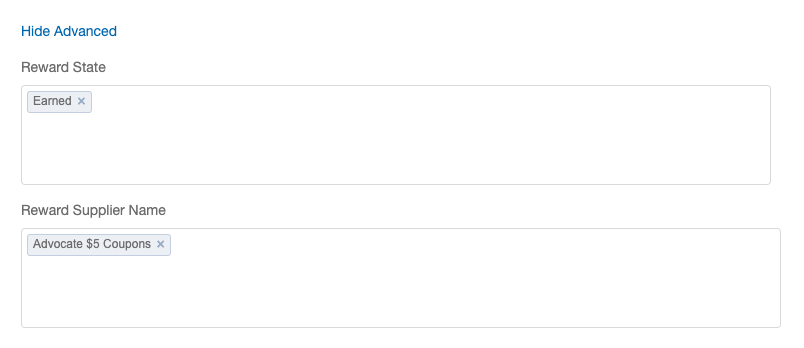 If multiple filters are present, they are evaluated as boolean expression, considering OR operators within the same group of filters (STATE, SUPPLIER), and considering AND operators between the groups.
For example, a webhook with three filters could look like the following:
If multiple filters are present, they are evaluated as boolean expression, considering OR operators within the same group of filters (STATE, SUPPLIER), and considering AND operators between the groups.
For example, a webhook with three filters could look like the following:
- Filter 1, state =
FAILED - Filter 2, supplier =
supplier_a_id - Filter 3, supplier =
supplier_b_id
(state == FAILED ) AND ( supplier == supplier_a_id OR supplier == supplier_b_id)
Filter Reward Events by State
Extole supports filtering reward events by state. A new reward event is fired when a new state for the reward is created. For example, a reward with stateSENT transitioned to REDEEMED will fire the reward_redeemed event.
Below are all the states and related events.
| State | Event |
|---|---|
| EARNED | reward_earned |
| FULFILLED | reward_fulfilledreward_fulfillment_failed |
| SENT | reward_sent |
| REDEEMED | reward_redeemed |
| REVOKED | reward_revoked |
| FAILED | reward_failed |
| CANCELED | reward_canceled |
Filter Reward Events by Reward Supplier
If you are interested only in reward events from a specific reward supplier (e.g., only your friend coupon rewards), you can add supplier filter to the webhook.Marking a Reward as Fulfilled
After you have received a reward and fulfilled it into your account credit system, you should mark the reward as “fulfilled” in Extole. This will cause Extole to stop sending retries for the reward and Extole can send out a reward fulfillment email to the recipient.data
Input Fields
| Field Name | Description |
|---|---|
message
required | A message about the fulfillment that can appear. It can simply be “fulfilled.” |
partner_reward_idoptional | An optional unique reward identifier for the reward on your side such as a confirmation code or number. This is often the coupon code, and sometimes the account credit ID or gift card ID. |
cost_codeoptional | If you need to track the reward to a cost code, this can be used. This allows for reporting from Extole rewards based on cost code. |
Response Fields
| Field | Description |
|---|---|
reward_id | The Extole unique identifier for the reward. |
reward_supplier_id | The Extole unique reward supply ID. |
partner_reward_supplier_id | The partner identifier configured inside of Extole for this identifier. |
person_id | The Extole unique identifier for the Person who earned the reward. |
partner_user_id | The partner identifier for this user. This ID is something YOU passed to Extole in the tags or events. |
email | The email address in Extole for reward recipient. |
partner_reward_id | The partner ID, if set. This is often the coupon code, and sometimes the account credit ID or gift card ID. |
state | Will respond with the reward state, which is FULFILLED. |
created_at | Indicates when the reward was created at (e.g., 2020-05-28T13:53:02.175-05:00). |