
Overview
Google offers a free JavaScript-based tag manager. You can use Google Tag Manager (GTM) to manage all of the Extole tags on your website pages. If you already have GTM integrated with your website, then no additional website development is required. You will only need to create and configure your tags using GTM.Prerequisites
Integration
Set Up Variables
Extole tags require dynamic information that provide context on your site’s user and conversion details. Google Tag Manager offers an easy way to define and manage the necessary JavaScript variables, HTML elements, URL parameters and other sources that are required to define Extole tags and filter triggers. The specific configuration of your variables will depend on how your site provides data to Extole. The table below lists the Extole variables you will need to create in GTM.Variable names may be differentYou may decide to name your GTM variables slightly differently, but the above list provides the basic variables you will need to define.
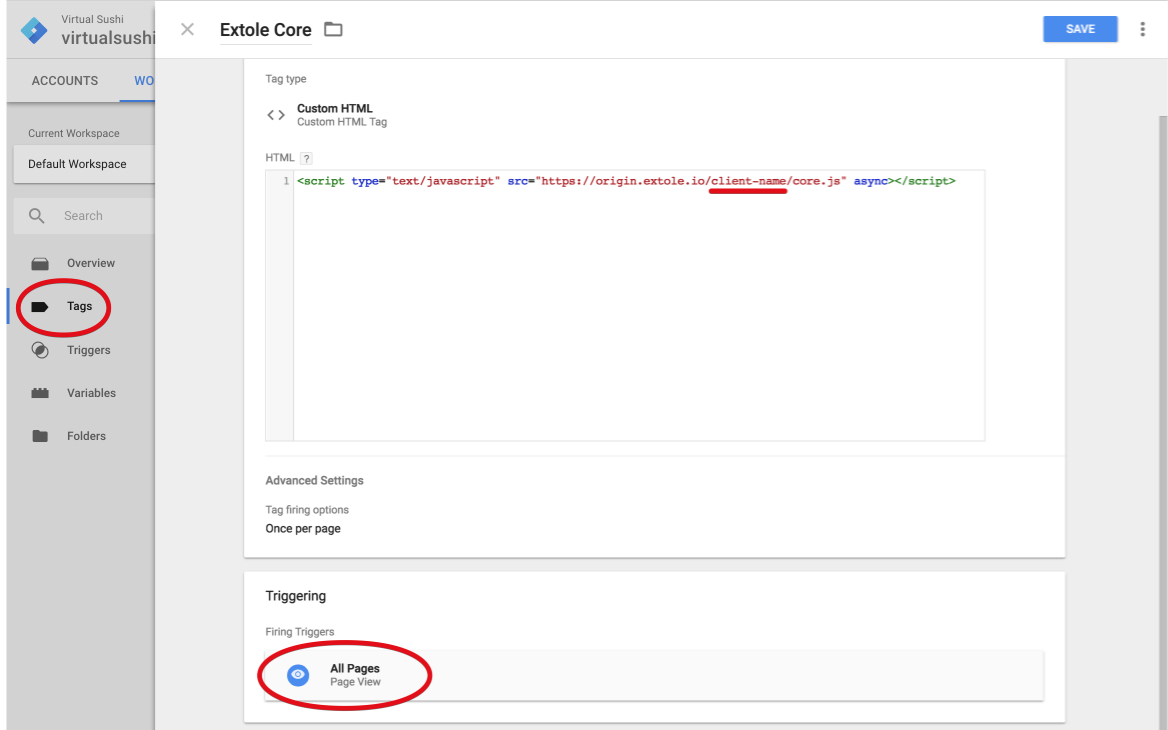
Add the Extole Core JavaScript Library
The Extole JavaScript (JS) library should be added to all of your site pages. This tag is used to activate the Extole system and ensures that any other Extole tags on your pages work properly. It also detects when someone has come to your page through a referral, and automatically serves the friend landing experience. To add the Extole JS library:- Create a new tag in GTM named Extole Main.
- Define this tag with the JS snippet below and configure it to fire on all pages.
Extole Core Tag
The core tag is under your program’s branded domain domain (refer.brand.com), but prior to setting up the branded domain it’s possible to load the tag from the Extole unbranded domain. You can find your domain in the Tech Centerof My Extole . Find your active referral domain and use that for you site of your core tag. It will look likebrand.extole.io (unbranded) or refer.brand.com (branded).
first_name
last_name
Add Conversion Tag
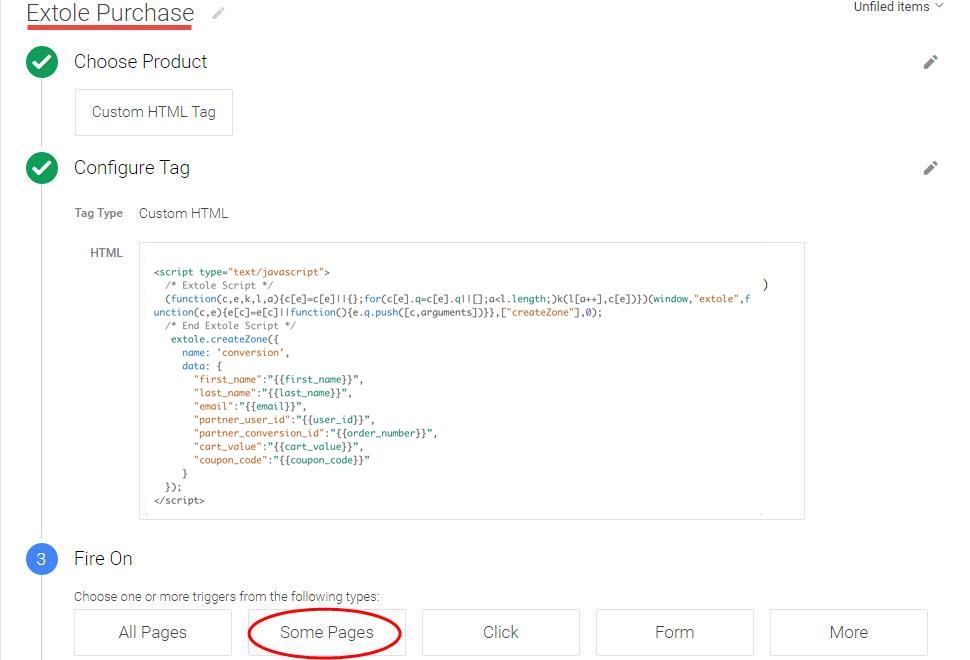
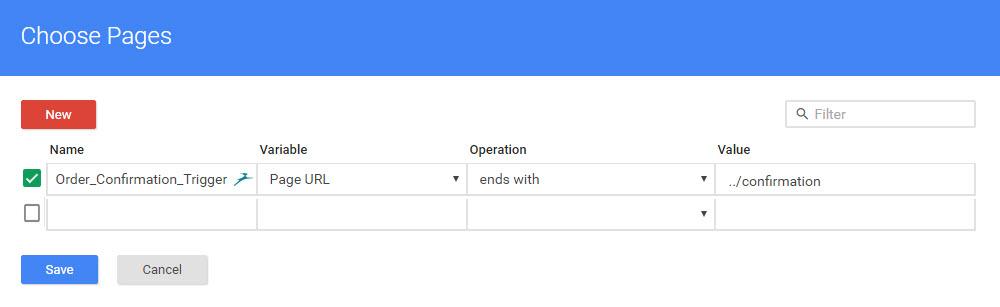
Most marketing campaigns reward advocates when a conversion event occurs, such as a purchase or creation of a new account. These events are communicated to Extole by adding a conversion tag to the conversion confirmation page on your site. Create a new conversion tag named Extole Purchase by using the following code snippet. Configure this tag to fire on your confirmation page.email
When finished, your tag should look something like this:
Add Marketing Tags
A CTA zone represents a particular section of content real estate on your site pages that allows your team to engage your advocates with multiple campaigns/creatives/messages. A zone to the Extole platform is similar to a zone with an ad server, site analysis tool, or testing framework. An Extole campaign includes the following set of standard zone names:global_headerglobal_footermy_accountconfirmation
How Extole Targets the Location of Content
There are three methods Extole tags use to target the location of content when inserted into a website page (such as a CTA):elementprovides a JavaScript object representing an HTMLelement. Extole will insert content directly into this element.element_idprovides an HTMLelement id. Extole will scan the page until an HTML element appears and is identified by this uniqueelement id. It will then insert the content and stop scanning.nothingis used if noelementorelement_idis passed. Extole will insert an hiddendivtag at the end of the page to receive content. This works well for zones without content (e.g., conversion) or for overlay content (e.g., an auto-show share experience).
user_id
The following tag is added into Google Tag Manager which connects the HTML element with Extole system.
partner_user_id
When finished, your tag should look something like this:
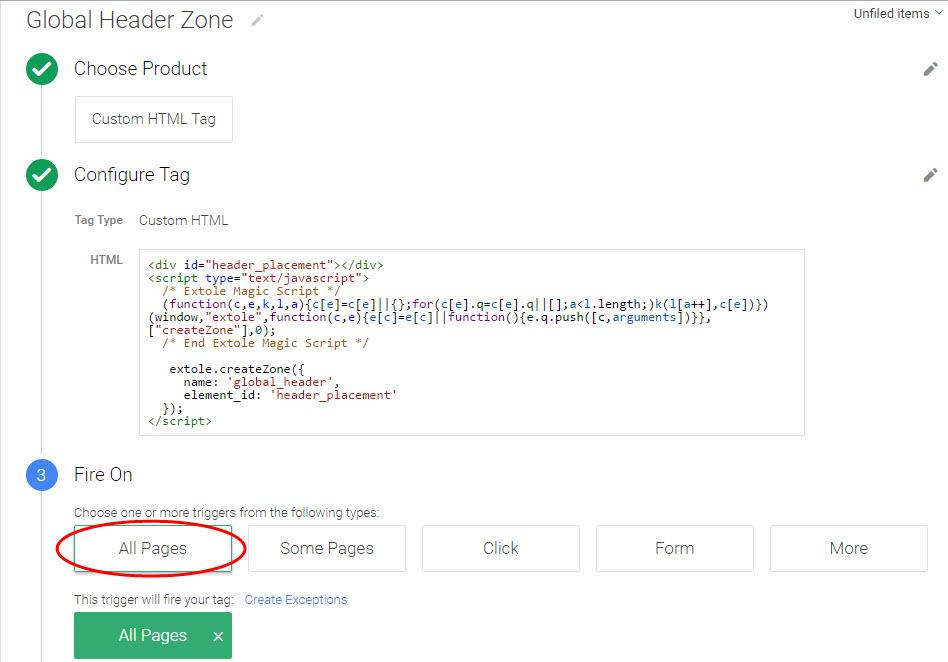 In this example, you can see that the zone tag, Global Header Zone, has been inserted into the HTML element_id as “header_placement.”
Frequently Asked Questions
Where can I learn more about Google Tag Manager?
Please visit the Google help page: https://support.google.com/tagmanager/Does block order matter?
Block order does not matter. All tags having a script at the top that will cause the tag to execute immediately if the core tag has been loaded or to execute once the core tag is loaded.Does Extole support other tag managers?
Yes. Extole works with all tag management systems.Are there any limits on the partner_conversion_id?
Thepartner_conversion_id has a maximum length of 38 characters and must be a unique identifier. If you pass Extole multiple conversions with the same partner_conversion_id, only the first conversion will be captured and all other others will be rejected as duplicate.