> ## Documentation Index
> Fetch the complete documentation index at: https://doc.extole.com/llms.txt
> Use this file to discover all available pages before exploring further.

# Headless and Mobile API

> Create a typical in-app share experience using Extole's Admin API with mobile phone built-in sharing capabilities.

## Overview

[//]: # "How do I integrate my mobile app using Extole's APIs?"

Leverage your customers on mobile by displaying Extole CTAs for your program in your app. In the case of a typical Refer A Friend program, potential advocates can click on these CTAs and see your Extole-powered Share Experience that will let them recommend your company to their friends via email, social share channel, or SMS.

![](https://files.readme.io/477c154c2e0837c7d486783474414481dc84cc24d09720c77d309238ca4be950-9d02da7-Screen_Shot_2023-02-03_at_3.46.45_PM.png)

[//]: ___

## Integration

[//]: # "How do I authorize users of my mobile app using Extole's APIs?"

### Authorize your Users

In order to interact with your programs at Extole, each time your mobile users log into your app the correct content and experience must be rendered. This process is made possible through access tokens, which are requested via Extole's Token API.

The purpose of this request is to create a device access token for a user's mobile device. This token can be stored on the device and re-used for future interactions with Extole. If the user logs into your app on the device as a different person this token should be deleted and a new token should be created. The base URL for all API calls is your branded program domain.

**You have two options for tokens**:

1. Verified Tokens
2. Unverified Tokens

#### Get and Store Verified Tokens

**JSON Web Tokens (JWTs)**

JWTs are Extole's preferred type of access tokens because they can return the most information about your users, such as private data like share history, reward history, and so on. This token type can also help personalize the mobile experience for your users by serving in-app stats like how many people have been referred and how many rewards have been earned.

`access_token`

This request will receive the following response:

`expires_in`

| Output Field   | Description                                                                                                                                                   |
| :------------- | :------------------------------------------------------------------------------------------------------------------------------------------------------------ |
| `access_token` | A random access token assigned to the device.                                                                                                                 |
| `expires_in`   | The number in seconds that identifies when the token expires. Generally the token will expire after 1 year, but this value may change based on configuration. |
| `scope`        | List of capabilities the token allows the associated user to perform.                                                                                         |

#### Get and Store Unverified Tokens

**Identified Tokens**\
Identified tokens are not verified, but will enable the Share Experience to be prefilled with the user's basic information. The user will also be targeted properly to the right program/campaign, but Extole will not be able to display any relevant stats.

**Anonymous Tokens**\
Anonymous tokens will allow users to receive public content and to share, but this type of token is not able to retrieve any of your users' personal data. Extole cannot show a specific or personalized experience with this type of token and cannot target until the user enters additional information.

An anonymous access token can be requested as shown below:

`scope`

Once a token has been created for the device, it should be sent to all subsequent API requests in the header:

`first_name`

[//]: ___

### Configure your Mobile Experience via API

[//]: # "How do I configure the creative content in my mobile app using Extole's APIs?"

To pull all of the creative content from your program in Extole and take advantage of Extole’s targeting engine, you must make a single call to Extole's [Get JSON Content API](https://docs.extole.com/reference/post-zone-content). This call passes your information about the user into your program and receives the proper content or zones—such as CTA s and advocate or friend experiences—as well as targeting results.

If the user is not logged in yet, making the request will return content but will not provide information about the user or a Share Code.

<Info>
  **Login Event**

  If you make the Zones API call prior to login and then the user registers or logs in, it's important to call the event again with the user's profile information. This will set the profile at Extole and update the content based on the targeting that applies to the user.
</Info>

Your users will get to experience all of the creative pieces you've configured in My Extole Campaign Editor when they log in to your app. The entire JSON structure of our Get JSON Content API is configurable, meaning we can tailor the information given in response to your company's specific needs.

<Tip>
  **Response Customization**

  Extole can create on/off switches, text fields, image fields, blocks, and sub-blocks to structure the JSON response in exactly the way that makes sense for your mobile app content and display. To learn more, reach out to your CSM and Launch Team.
</Tip>

The code example below is a reasonable default, but remember that Extole can add or remove any piece of JSON content.

`last_name`

<table>
  <thead>
    <tr>
      <th>
        Input Fields
      </th>

      <th>
        Description
      </th>
    </tr>
  </thead>

  <tbody>
    <tr>
      <td>
        `first_name`
      </td>

      <td>
        The person's first name. This is used for personalization of share messages, reporting, and customer support.
      </td>
    </tr>

    <tr>
      <td>
        `last_name`
      </td>

      <td>
        The person's last name. This is used for reporting and client customer support.
      </td>
    </tr>

    <tr>
      <td>
        `email`\
        *recommended*
      </td>

      <td>
        The person's email address.
      </td>
    </tr>

    <tr>
      <td>
        `partner_user_id`\
        *recommended*
      </td>

      <td>
        The unique identifier of the person provided by the client such as a user ID or customer ID, etc.
      </td>
    </tr>

    <tr>
      <td>
        `labels`\
        *recommended*
      </td>

      <td>
        The labels field may be passed into the URL parameter as a targeting hint to load a program other than the primary refer-a-friend program.
      </td>
    </tr>

    <tr>
      <td>
        `locale`
      </td>

      <td>
        The location and language of the person.
      </td>
    </tr>
  </tbody>
</table>

This request will receive the following response:

`email`

| Output Field          | Description                                                                                         |
| :-------------------- | :-------------------------------------------------------------------------------------------------- |
| `bundle_name`         | The name of the creative configured in My Extole.                                                   |
| `calls_to_action`     | The customized placements and messages of your CTA s configured in My Extole.                       |
| `sharing`             | The share channels and associated content (messages, images, descriptions) configured in My Extole. |
| `label`               | The program targeting label.                                                                        |
| `target_url`          | Your branded program domain.                                                                        |
| `share.share_message` | The share message to supply into the share sheet.                                                   |
| `me.email`            | The advocate’s email address.                                                                       |
| `me.first_name`       | The advocate’s first name.                                                                          |
| `me.last_name`        | The advocate’s last name.                                                                           |
| `me.partner_user_id`  | Your unique identifier for the advocate.                                                            |
| `me.shareable_link`   | The advocate’s share link.                                                                          |
| `me.advocate_code`    | The advocate’s share code.                                                                          |

The result of the example call above is used to set the content in the menu and run campaign targeting at Extole. All of the content is configurable and the entire structure of the JSON can be adjusted to include additional fields editable in My Extole. This allows your marketing team to change content such as "Refer" to "Share" and have it automatically reflected across desktop and mobile. It also allows your marketing team to run A/B tests that span web and mobile capabilities.

[//]: ___

[//]: # "What are the error conditions for Extole's APIs?"

**API Error Conditions**\
The basic structure of an error response from Extole is that it will return a different HTTP code than “200”, typically in the 4xx or 500 range.

[Learn more about our API Errors](https://docs.extole.com/docs/errors).

[//]: ___

#### WebView on Android Devices

[//]: # "How do I set up webview for Android devices?"

When configuring your mobile experience, you will want to consider the unique WebView limitations of Android devices:

1. Inside of a WebView, Native Sharing On Device (Share Intent with Share Sheet) is unavailable on many Android devices. In this situation, Extole will automatically not display the native share button.
2. Android Apps can support native sharing by passing a `JsExtoleShareImpl` object into the webview

`partner_user_id`

`labels`

[//]: ___

### Track Events

[//]: # "How do I track events on my mobile app using Extole's APIs?"

<Warning>
  **Important Note**

  **This step should not be skipped or delayed.**

  Developers sometimes skip this step because it does not have a large impact on the user experience or functionality of the app. This will, however, have a **huge** impact on your marketing team's ability to understand referrals and optimize the program.
</Warning>

To ensure that tracking shows correctly in your Extole analytics dashboard and that targeting continues to work correctly for all users, impression events need to be sent to Extole. For example, an impression event may be when a piece of referral content, such as a call-to-action, is displayed to the user.

#### What events should be tracked?

* Tracking CTA impressions will cause the impression count to show in your Extole Dashboard.
* Tracking CTA clicks will cause the Promotion Click Throughs to appear in your Dashboard.

To set up tracking for additional impressions and events, talk to your CSM and Launch Team.

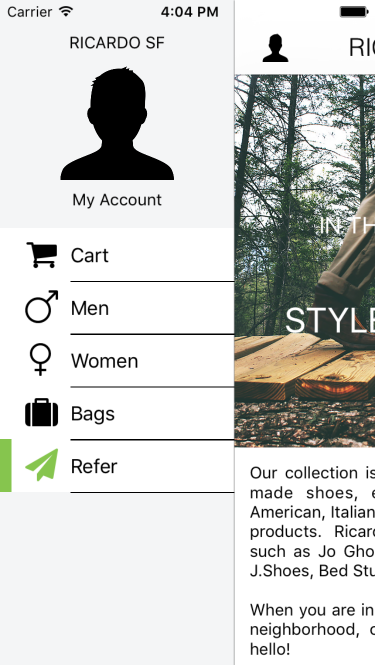
<img src="https://files.readme.io/301a7477ff7bff30e9b05e103a9e5ccab4c9de941b6eff6001dd3b79d004ba46-DsNuClYTNWUKvsUn4pkt_RicardoSF-MobileMenuCTA.png" alt="RicardoSF-MobileMenuCTA.png" width="30%" />

#### Track CTA Impressions

Make sure to include the Extole Access Token that was returned for the user in the header of the request.

`locale`

<table>
  <thead>
    <tr>
      <th>
        Input Field
      </th>

      <th>
        Value
      </th>
    </tr>
  </thead>

  <tbody>
    <tr>
      <td>
        `Authorization: Bearer`
        **string**
      </td>

      <td>
        Access token, provided in the request header
      </td>
    </tr>

    <tr>
      <td>
        `event_name`\
        **required**
      </td>

      <td>
        The name of the mobile event being tracked.  For calls to action, examples are:

        * mobile\_menu\_cta
        * mobile\_confirmation
        * mobile\_cta\_viewed
      </td>
    </tr>

    <tr>
      <td>
        `data.source`
      </td>

      <td>
        Typically the location of the CTA, prepended with “zone:”

        Examples:

        * zone:mobile\_menu\_cta
        * zone:mobile\_confirmation
        * zone:mobile\_quickaction
      </td>
    </tr>

    <tr>
      <td>
        `data.labels`
      </td>

      <td>
        The program labels for targeting
      </td>
    </tr>
  </tbody>
</table>

#### Track CTA Taps

When a user taps on a CTA in your mobile app, the event is recorded by calling the Extole Events API.

![374](https://files.readme.io/c18384028481606de587a7dcb2c70e593459f97fdd354d21744104071e4dc203-CaxPETTDQd69xQQTJW7c_RicardoSF-Share.png "RicardoSF-Share.png")

`bundle_name`

<table>
  <thead>
    <tr>
      <th>
        Input Field
      </th>

      <th>
        Description
      </th>
    </tr>
  </thead>

  <tbody>
    <tr>
      <td>
        `Authorization: Bearer`
        **string**
      </td>

      <td>
        Access token, provided in the request header.
      </td>
    </tr>

    <tr>
      <td>
        `Accept`
      </td>

      <td>
        application/json, provided in request header
      </td>
    </tr>

    <tr>
      <td>
        `Content-Type`
      </td>

      <td>
        application/json
      </td>
    </tr>

    <tr>
      <td>
        `event_name`\
        **required**
      </td>

      <td>
        The name of the mobile event being tracked. For calls to action, this is typically:\
        `mobile_share_page`\
        `mobile_cta_clicked`
      </td>
    </tr>

    <tr>
      <td>
        `data.source`\
        **required**
      </td>

      <td>
        The name of the event that is being tracked. Typically the location of the CTA:\
        `homepage_button_cta`\
        `mobile_menu_cta`\
        `deep_link_url`
      </td>
    </tr>

    <tr>
      <td>
        `data.labels`
      </td>

      <td>
        The program labels for targeting
      </td>
    </tr>
  </tbody>
</table>

[//]: ___

### Enable Link Sharing

[//]: # "How do I enable link sharing on my mobile app using Extole's APIs?"

Sharing links is done using the native sharing of the operating system. When the user clicks on the link to share, you should:

* Generate a unique Partner Share ID
* Track the Share Event via Extole's Events API
* Trigger native sharing with the link + Partner Share ID

#### Generate Unique Partner Share IDs

To ensure that your mobile app can perform quickly and have limited calls to Extole, you create your own unique share identifier in the mobile app. We recommend this being a combination of a unique identifier for the device combined with a timestamp to prevent duplicating share IDs.

`calls_to_action`
`sharing`

#### Track the Share Event

The Share Event is tracked in Extole when the user chooses to share. This will track the share in My Extole and provide a unique Share Id that can be appended to the link so when the friend taps through the journey, their actions can be fully described in reporting.

`label`

<table>
  <thead>
    <tr>
      <th>
        Input Field
      </th>

      <th>
        Description
      </th>
    </tr>
  </thead>

  <tbody>
    <tr>
      <td>
        `event_name`
        **required**
      </td>

      <td>
        "Share" - Indicates this is share event.
      </td>
    </tr>

    <tr>
      <td>
        `data.source`
      </td>

      <td>
        The source zone of the share.
      </td>
    </tr>

    <tr>
      <td>
        `data.share.channel`
      </td>

      <td>
        The channel the advocate is sharing on. When using native sharing, you can select “mobile” as the channel.

        If doing a direct integration to an email, you can specify a messages share as “EMAIL” or “SMS.”
      </td>
    </tr>

    <tr>
      <td>
        `data.partner_share_id`
      </td>

      <td>
        This is a unique identifier that is generated by your mobile app. It is passed into the share event AND appended to the end of the Share Link that goes out. This allows metrics to link the friend’s click on the link back to this share.
      </td>
    </tr>

    <tr>
      <td>
        `data.\*`
      </td>

      <td>
        Arbitrary data to be associated with the share.
      </td>
    </tr>
  </tbody>
</table>

`target_url`

| Output Field | Description                |
| :----------- | :------------------------- |
| `event_id`   | A unique ID for the event. |

#### Share the Link

You can now combine the Share Link with the Partner Share Id to create the URL that should be passed into the OS share APIs:

`share.share_message`

Device Code Examples:

`me.email`
`me.first_name`

#### Share via Email

Typically in a mobile app, you can send emails using the native device email client. However, you can instead choose Extole to send emails on behalf of your users.

`me.last_name`

Result:

`me.partner_user_id`

[//]: ___